EN

Language

Some screens are still being translated.

Illustrative vineyard rows in warm morning light, with a limestone winery beyond

For the people behind the vintage

Every vine.
Every vintage.
One connected story.

From the first walk through the rows to the work inside the cellar. Bring your observations, records and next decisions into view.

A thoughtfully built private pilot. Let’s start with your estate.

Rooted in the vineyard.
Connected to the cellar.

01 / The continuous recordDiscover a clearer day by Arquero Studios

A little less scattered. A lot more connected.

Your knowledge is part
of the estate.
Keep it growing.

The photograph on a phone. The survey in a spreadsheet. The tank reading on a scrap of paper. Each tells part of the story.

Blanquefort gives that knowledge a place: a parcel, a vine, a lot, a vessel. So when someone asks “What happened here?” the answer starts with the record, rather than a search through yesterday’s messages.

Follow the work, from field to cellar ↘

From a parcel to a single vine.

Know where an observation belongs, keep its evidence and turn the pattern into a reviewed plan.

  • Maps & 3D parcel views
  • Vine condition & history
  • Field notes & original photos
  • Walk-the-row recording
  • Survey imports & identity
  • Reviewed planting plans

The work, with its context

One season.
Fewer loose ends.

Start where you work. Keep the history connected as the next person, task or season takes over.

01 / The vineyard

Know the place.
Remember the detail.

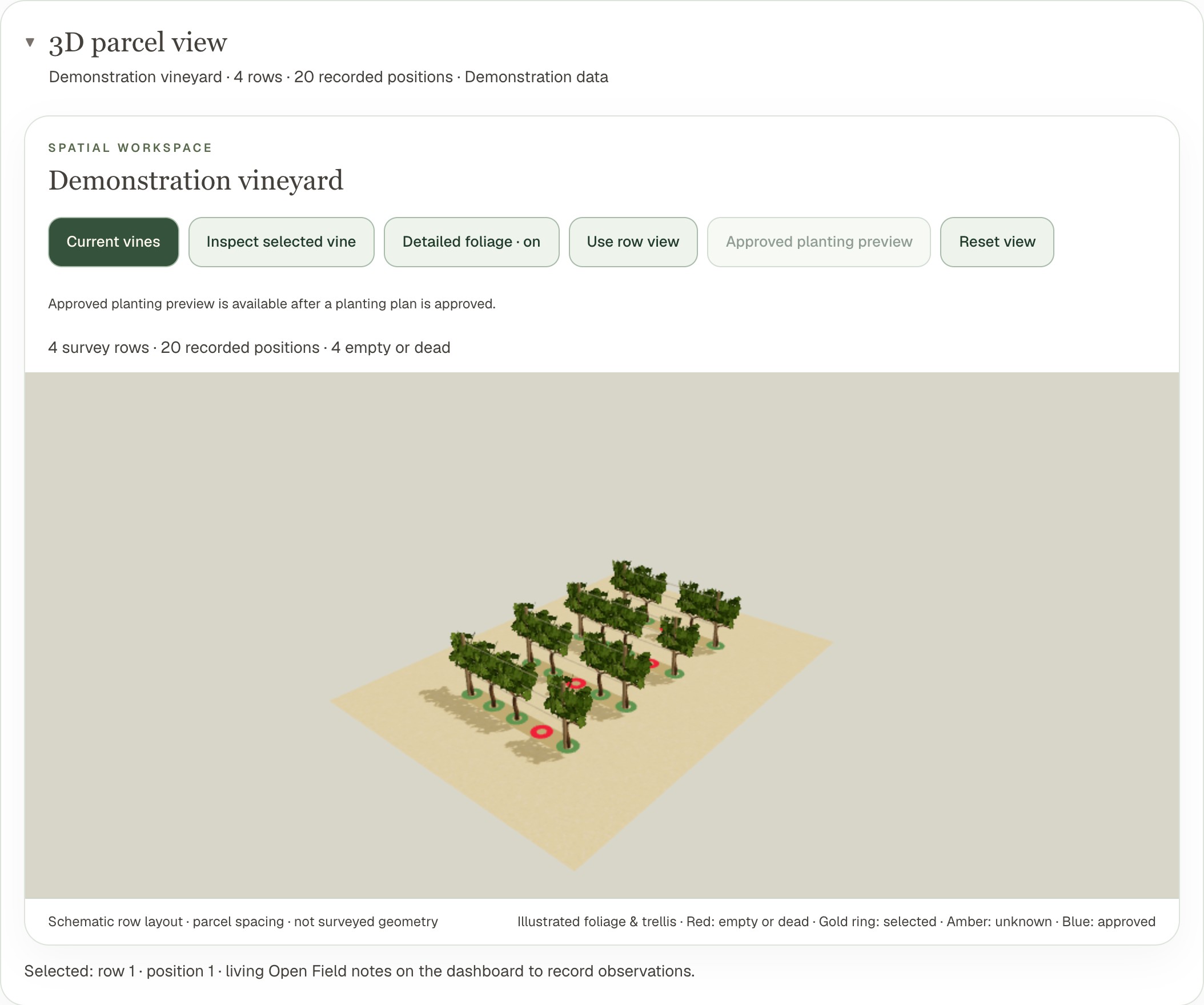
Bring parcels and survey rows into maps and 3D. Open a vine’s record, capture its condition, add a note and return to the evidence when it is time to decide what happens next.

  • Parcel, row and vine identity
  • Field notes, original photographs and history
  • Walk-the-row recording and reviewed planting plans

Built for the record you’ll need next season.
● ● ●Blanquefort / Vineyard↗
Existing Blanquefort screen showing a synthetic vineyard in 3D
Real app screen · synthetic demonstration data
02 / The cellar

See the vessel.
Understand the wine.

Connect receiving, lots and vessel contents to the work that changed them. Find the source of the fruit, review recorded readings, follow transfers and understand a quality hold before preparing the next action.

  • Source-to-lot history and recorded quantities
  • Readings, production operations and quality holds
  • Supplies, stock movements, orders and receipts

A visual cellar should help you work, not just look.

The cellar / operational viewDesign preview
T04 · Merlot 2026A hold is a reason to look closer.
On hold

Open the quality record. Review the observation and its history. Keep the next action connected to the evidence.

Proposed visual direction · illustrative records · not a live cellar
03 / The handover

The fruit changes hands.
The story stays with it.

Season and harvest workflows connect planned work, recorded hours, maturity observations, picks and weigh tickets to winery receiving. Keep parcel, variety and vintage together as the fruit becomes a lot.

Parcel & pickWeigh ticketReceiving & lotCellar history
Harvest workflows are deployed in the pilot. Field acceptance is still in progress.

A minute inside Blanquefort

From every vine
to every vintage.

A short visual story of the connected estate.
Illustrative scenes and the proposed new interface.

01:06 · Design film · original music · no customer dataDownload film
Read the film transcript

00:00 Every vine. Every vintage. One connected story.

00:07 An estate holds more than rows and vessels. It holds the observations, decisions and details that shape a vintage.

00:18 Blanquefort brings the vineyard into view. Explore parcels, return to a vine, and keep its notes and original evidence together.

00:30 Inside the cellar, connect source, lot and vessel records. Review what happened, what was recorded, and what needs a closer look.

00:42 Seasonal work and harvest connect the field to receiving, while a clearer workspace keeps the evidence beside the decision.

00:54 From every vine to every vintage. Blanquefort. Vineyard and winery intelligence. Request a personal walkthrough.

Designed around a working day

The right detail.
At the right moment.

Less hunting for information. More time to understand what needs your attention.

In the rows

Record it while
you’re there.

Keep the selected parcel and vine clear. Record an observation, preserve its photograph, and carry saved device work through patches of poor connectivity.

At the cellar

Check the record
before the next move.

Review contents, recorded checks and holds alongside the lot’s history. Prepare the next operation with quantities and identity in view.

Back at the desk

Turn evidence
into a decision.

Review planting plans, stock needs and the records behind a question. Contextual AI assistance supports your judgement; it does not replace it.

The practical side of the season

Know what you have.
Review what comes next.

From field supplies to cellar consumables, stock is part of the work—not a separate spreadsheet.

01 / Stock

Count what is
actually there.

Track items, sites, batches, recorded use and counts. Keep available stock distinct from quantities already reserved for work.

02 / Replenishment

A policy, not
a last-minute guess.

Review min/max or lead-time rules alongside supplier pack sizes and order terms. Replenishment proposals still require a person's review and the owner's approval.

03 / Receiving

Record what
really arrived.

Follow orders through partial receipts and accepted or rejected stock. A proposal does not send an order or spend money on its own.

Another perspective. Your judgement.

Ask a better question.
Keep the evidence close.

AI assistance belongs alongside the record you are reviewing. It should show its context, acknowledge missing information and help you understand your options.

The new assistant experience is designed around evidence-linked answers and clear boundaries. Actual actions still go through the normal forms, permissions and approvals.

Live AI expert evaluation is pending. The example opposite is explanatory copy, not a generated answer or diagnosis.

The kind of question worth asking

“What should I review
before moving this lot?”

Start with the hold record, the latest observations and the lot’s movement history. Missing readings should be visible, rather than guessed.

Quality recordRecorded readingsLot history

Proposed experience · illustrative example

01

Your observations
keep their context.

Original evidence and history belong with the record they describe.

02

Saved here is different
from saved to cloud.

Clear device and sync states matter when work moves between the field and the office.

03

Your team.
Appropriate access.

Owners, editors and viewers work within the app’s permissions and review steps.

A few practical questions

Before we
walk the estate.

Is this for a vineyard, a winery, or both?

All three are part of the product direction. Vineyard records, winery operations and supplies have working implementations. The private pilot and a walkthrough establish which workflows fit your operation today. This preview also shows parts of the new interface that are still being built.

What is available today?

The existing pilot includes parcel and vine records, maps and 3D, observations and original evidence, planning, winery records and supplies. Harvest workflows are deployed in the pilot, with field acceptance still in progress. The new navigation, Today view, visual workspace and assistant presentation are new interface work arriving in stages. This page is a design preview, not a release announcement or a claim that every workflow has passed hosted acceptance.

Can I begin with existing survey records?

The app includes spreadsheet import workflows. A walkthrough is the right place to review your actual file structure, row labels and parcel information before bringing in real records. There is no automatic promise that an arbitrary file will import without review.

What happens if I lose connectivity?

Open and save the vineyard on the device before heading offline. Supported device work can be kept locally and synced after reconnecting, when access is checked again. Original uploads and live AI require connectivity. A local save is not yet cloud confirmation.

Does the AI make decisions or change records for me?

No autonomous action is promised. Assistance supports a person's judgement and should identify its context and limitations. Live expert evaluation is still pending. Changing records uses the normal validated operations and actual user permissions.

Does this include wine sales, shipping and tax filing?

Blanquefort records wine sales, fruit sales and a wine club, with a list for your accountant. It is not a compliant point of sale, an alcohol shipping service or a tax-filing system, and it does not produce legal invoices, label checks or excise returns. We’ll discuss your wider workflow during a walkthrough.

How do I get access?

Blanquefort is a private pilot. Request a walkthrough at info@blanquefort.app. Already invited? Sign in with your invited account. No public checkout or pricing commitment is made on this page.

Your estate has a story worth keeping.

Let’s make the next
chapter clearer.

Start with a conversation about your vineyard, your cellar
and the work you want to bring together.

Request a walkthrough Private pilot · personal walkthrough